IPv4 Internet Protocol Version 4
What is IPv4?
IPv4 is the fourth version of the Internet Protocol [IP], widely used to identify devices on a network through an addressing system.
It was introduced in 1981 by DARPA and became the first deployed version for production use on SATNET and ARPANET in 1982 and 1983, respectively.
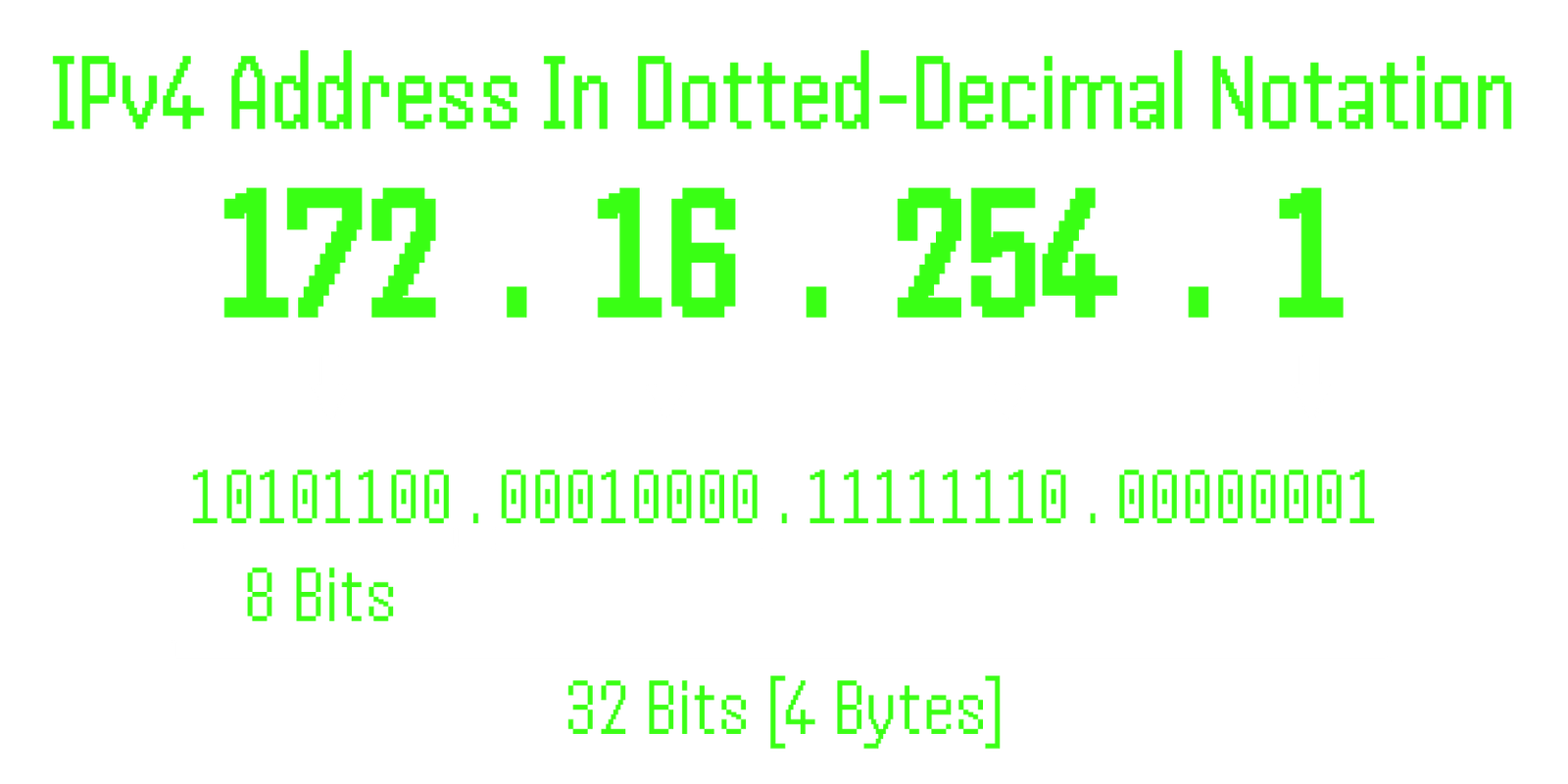
IPv4 addresses are 32-bit numbers written in Decimal Notation, consisting of four decimal values separated by dots, each ranging from 0 to 255.
These numbers are converted into binary [0s and 1s] to be processed by computers.
An example of an IPv4 address is 172.16.254.1:
Parts of IPv4:
An IPv4 address consists of three parts: the Network Part, the Host Part, and, optionally, the Subnet Number.
Network Part - This portion identifies the specific network the address belongs to and determines the class of the network [e.g., Class A, B, C].
It is used to route traffic to the appropriate network.
Host Portion - The host portion uniquely identifies each device [or host] within the network.
This allows each device on the network to be differentiated and addressed individually.
Subnet Number [Optional] - Used when large local networks are divided into subnets for organizational or efficiency purposes.
Subnets allow for more efficient use of the available IP addresses within a network by breaking it into smaller divisions.
Characteristics of IPv4:
32-bit Addressing - IPv4 uses a 32-bit address, which allows for approximately 4.3 billion unique addresses.
VLSM [Variable-Length Subnet Masking] - IPv4 supports the use of different subnet masks across a network,
allowing for flexibility in dividing the network.
Unicast, Broadcast, and Multicast Addresses - IPv4 supports three types of addressing:
1. Unicast: Sending data to a single recipient.
2. Broadcast: Sending data to all devices in the network.
3. Multicast: Sending data to a specific group of devices.
DHCP [Dynamic Host Configuration Protocol] - Networks can be configured either manually or automatically using DHCP,
which assigns IP addresses to devices dynamically.
Packet Fragmentation - IPv4 allows routers to fragment packets to fit the Maximum Transmission Unit [MTU] of the network.
RIP [Routing Information Protocol] - IPv4 supports RIP, a simple routing protocol used to manage routing information between routers.
Address Representation - IPv4 addresses are represented numerically, with each octet [8 bits] separated by a dot [e.g., 172.16.254.1].
ARP [Address Resolution Protocol] - IPv4 uses ARP to map IP addresses to MAC addresses on a local network.
Header Fields - IPv4 headers contain 12 fields with a total length of 20 bytes, including the source and destination addresses,
packet length, and other control information.
The Classes of IPv4 Addresses:
Class A - This class of IP addresses uses the first octet to represent the network portion,
and the remaining three octets to represent the host portion.
Class A addresses range from 1.0.0.0 to 126.0.0.0 and are intended for very large networks.
Private IP range: 10.0.0.0 to 10.255.255.255
Class B - This class of IP addresses uses the first two octets to represent the network portion,
and the remaining two octets to represent the host portion.
Class B addresses range from 128.0.0.0 to 191.255.0.0 and are intended for medium-sized networks.
Private IP range: 172.16.0.0 to 172.31.255.255
Class C - This class of IP addresses uses the first three octets to represent the network portion,
and the remaining octet to represent the host portion.
Class C addresses range from 192.0.0.0 to 223.255.255.0 and are intended for small networks.
Private IP range: 192.168.0.0 to 192.168.255.255
Class D - This class of IP addresses is used for multicasting.
Multicast addresses begin with the binary pattern of 1110 in the first four bits of the first octet.
Class D addresses range from 224.0.0.0 to 239.255.255.255.
Class E - This class of IP addresses is reserved for experimental use and is not used for general networking purposes.
Class E addresses range from 240.0.0.0 to 255.255.255.255.
Public IP Addresses: These are globally unique addresses that are routable on the internet.
They are assigned by Internet Service Providers (ISPs) and can be accessed from anywhere on the internet.
Public IPs are used for servers, websites, and devices that need to be directly accessible from the internet.
Private IP Addresses: These are reserved for use within private networks and are not routable on the public internet.
They are defined by RFC 1918 and can be reused across different private networks without conflict.
Devices using private IPs access the internet through Network Address Translation (NAT), which converts private IPs to public IPs.
Network Address Translation [NAT]
Network Address Translation [NAT] is a process that allows multiple devices within a private network
to access the internet using a single public IP address.
NAT is essential for conserving public IP addresses and enhancing privacy by hiding the internal IP addresses of network devices.
It translates private IP addresses to public IP addresses and vice versa, typically operating on a router or firewall.
What is Network Address Translation [NAT]?
NAT is a mechanism in which one or more private [local] IP addresses are translated into one or more public [global] IP addresses.
It also handles the translation of port numbers to facilitate internet access for internal hosts.
By masking the internal IP and port numbers with a public IP and alternate port numbers,
NAT ensures seamless communication between the internal network and external systems.
NAT keeps track of these translations using a NAT table, which logs the original and translated IP addresses and port numbers.
NAT typically operates on a router that serves as a gateway between the internal [private] network and the external [public] network.
How Network Address Translation [NAT] Works
NAT is generally implemented on a border router,
a router that has one interface connected to the internal [local] network and another to the external [global] network.
The process works as follows:
When a packet leaves the internal network, NAT translates the local [private] IP address to a global [public] IP address.
When a packet returns to the internal network, NAT converts the global [public] IP address back to the local [private] IP address.
If the NAT device runs out of public IP addresses from the configured pool, the packets will be dropped,
and an ICMP [Internet Control Message Protocol] message is sent, indicating that the host is unreachable.
Why Mask Port Numbers?
Port numbers are masked by NAT to avoid conflicts when multiple internal hosts communicate with the same external destination using the same port.
For instance, if two internal hosts [A and B] request access to the same external server on port 1000, NAT must distinguish between their connections.
Simply translating their IP addresses wouldn't be enough, as both requests would appear to come from the same public IP.
To solve this, NAT modifies the source port numbers and logs them in the NAT table, ensuring the correct responses are routed back to the right hosts.
NAT Inside & Outside Addresses
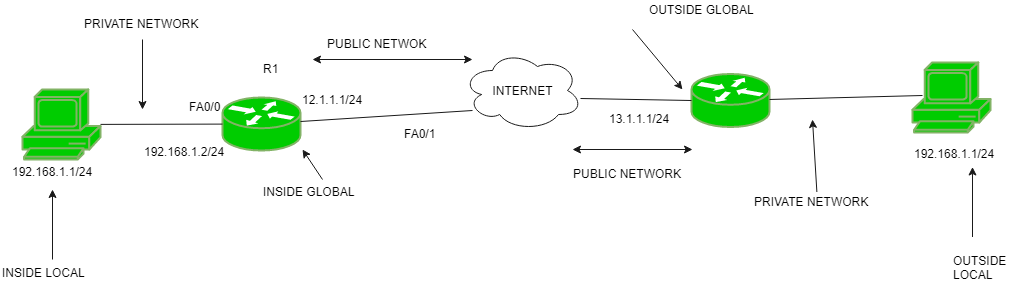
Inside Local Address - The private IP address assigned to a host within the internal network.
This address is typically not visible from the outside.
Inside Global Address - The public IP address assigned to represent the internal host to the external network.
Outside Local Address - The private IP address of an external host, used within the internal network after translation.
Outside Global Address - The public IP address of an external host, used before translation occurs.
NAT Can Be Configured In Three Primary Ways:
Static NAT - A one-to-one mapping is created between a private [unregistered] IP address and a public [registered] IP address.
This method is often used for services like web hosting, where a specific internal server needs to be accessible from the outside.
However, static NAT is not suitable for large-scale networks since each internal device would require a unique public IP address,
which can be costly and impractical.
Dynamic NAT - Private IP addresses are mapped to public IP addresses from a predefined pool. The translation occurs only if
a public IP is available in the pool.
If the pool runs out of available public IP addresses, additional requests will be dropped.
This method is more scalable than static NAT, but still limited by the size of the public IP address pool.
Port Address Translation [PAT] / NAT Overload - Allows multiple private IP addresses to share a single public IP address by distinguishing traffic based on port numbers.
This is the most commonly used form of NAT because it allows thousands of devices to access the internet using just one public IP address, making it highly cost-effective.
PAT modifies both IP addresses and port numbers, keeping track of each session in the NAT table.
Advantages of NAT:
IP Address Conservation - NAT reduces the number of public IP addresses needed by allowing multiple devices to share a single public address.
Enhanced Privacy - By masking internal IP addresses, NAT hides the details of internal devices from the external network.
Flexibility in Network Addressing - NAT eliminates the need for renumbering internal IP addresses when the network grows or changes.
Disadvantage of NAT:
Increased Latency - Translating IP addresses and port numbers can introduce delays in packet forwarding, especially in high-traffic networks.
Incompatibility with Certain Applications - Some applications, particularly those that embed IP address information within their payloads
[e.g., certain VoIP or VPN services], may not function properly with NAT.
Complication of Tunneling Protocols - NAT can interfere with tunneling protocols such as IPsec, which require direct IP address visibility.
Layer Violation - NAT operates at the network layer, but it manipulates transport-layer data [i.e., port numbers], which can lead to complexities in troubleshooting and performance optimization.
Conclusion:
NAT plays a crucial role in managing the depletion of IPv4 addresses while enhancing network security by obscuring internal IP addresses.
Its cost-effectiveness, particularly with PAT, makes it indispensable for networks requiring internet connectivity for a large number of devices.
Despite its limitations, such as increased latency and potential conflicts with specific applications, NAT remains a widely used solution, particularly during the transition from IPv4 to IPv6.
| Class |
Address Range |
Private IP Range |
Network/Host Octets |
Purpose |
Example (Public) |
Example (Private) |
| Class A |
1.0.0.0 to 126.255.255.255 |
10.0.0.0 to 10.255.255.255 |
First octet for network, remaining three for host |
Very large networks |
8.8.8.8 |
10.0.0.1 |
| Class B |
128.0.0.0 to 191.255.0.0 |
172.16.0.0 to 172.31.255.255 |
First two octets for network, remaining two for host |
Medium-sized networks |
151.101.1.140 |
172.16.0.1 |
| Class C |
192.0.0.0 to 223.255.255.0 |
192.168.0.0 to 192.168.255.255 |
First three octets for network, remaining one for host |
Small networks |
216.58.214.206 |
192.168.1.1 |
| Class D |
224.0.0.0 to 239.255.255.255 |
N/A |
N/A |
Multicasting |
224.0.0.5 |
N/A |
| Class E |
240.0.0.0 to 255.255.255.255 |
N/A |
N/A |
Reserved for experimental use |
250.0.0.1 |
N/A |
Subnet Mask
A subnet mask is a 32-bit number that is used to determine which part of an IP address belongs to the network and which part belongs to the host.
It works by masking off the network portion of an IP address to identify the host portion.
In IPv4, subnet masks are commonly used to divide a network into smaller sub-networks,
allowing for better organization and management of network resources.
CIDR [Classless Inter-Domain Routing] notation is a compact representation of an IP address and subnet mask.
CIDR notation consists of the IP address followed by a slash [/] and a number that indicates the number of network bits in the subnet mask.
For example, 192.168.0.0/24 represents an IPv4 address with a subnet mask of 255.255.255.0.
/8, /16, and /24 are common subnet mask values used to create smaller sub-networks within a larger network.
A subnet mask of /8 [255.0.0.0] creates a very large network with up to 16,777,216 hosts.
This type of network is typically used by large organizations or internet service providers.
A subnet mask of /16 [255.255.0.0] creates a moderately sized network with up to 65,536 hosts.
This type of network is often used by mid-sized organizations or for regional network deployments.
A subnet mask of /24 [255.255.255.0] creates a smaller network with up to 256 hosts.
This type of network is commonly used for small office or home office networks, as well as for point-topoint connections.
| Bits |
CIDR |
Subnet Mask |
Total IP Address |
Usable IP Address |
| 0 |
/32 |
255.255.255.255 |
1 |
1 [used for a single host route or loopback] |
| 1 |
/31 |
255.255.255.254 |
2 |
2 [Point-To-Point Links] |
| 2 |
/30 |
255.255.255.252 |
4 |
2 |
| 3 |
/29 |
255.255.255.248 |
8 |
6 |
| 4 |
/28 |
255.255.255.240 |
16 |
14 |
| 5 |
/27 |
255.255.255.224 |
32 |
30 |
| 6 |
/26 |
255.255.255.192 |
64 |
62 |
| 7 |
/25 |
255.255.255.128 |
128 |
126 |
| 8 |
/24 |
255.255.255.0 |
256 |
254 |
| 9 |
/23 |
255.255.254.0 |
512 |
510 |
| 10 |
/22 |
255.255.252.0 |
1,024 |
1,022 |
| 11 |
/21 |
255.255.248.0 |
2,048 |
2,046 |
| 12 |
/20 |
255.255.240.0 |
4,096 |
4,094 |
| 13 |
/19 |
255.255.224.0 |
8,192 |
8,190 |
| 14 |
/18 |
255.255.192.0 |
16,384 |
16,382 |
| 15 |
/17 |
255.255.128.0 |
32,768 |
32,766 |
| 16 |
/16 |
255.255.0.0 |
65,536 |
65,534 |
| 17 |
/15 |
255.254.0.0 |
131,072 |
131,070 |
| 18 |
/14 |
255.252.0.0 |
262,144 |
262,142 |
| 19 |
/13 |
255.248.0.0 |
524,288 |
524,286 |
| 20 |
/12 |
255.240.0.0 |
1,048,576 |
1,048,574 |
| 21 |
/11 |
255.224.0.0 |
2,097,152 |
2,097,150 |
| 22 |
/10 |
255.192.0.0 |
4,194,304 |
4,194,302 |
| 23 |
/9 |
255.128.0.0 |
8,388,608 |
8,388,606 |
| 24 |
/8 |
255.0.0.0 |
16,777,216 |
16,777,214 |
| 25 |
/7 |
254.0.0.0 |
33,554,432 |
33,554,430 |
| 26 |
/6 |
252.0.0.0 |
67,108,864 |
67,108,862 |
| 27 |
/5 |
248.0.0.0 |
134,217,728 |
134,217,726 |
| 28 |
/4 |
240.0.0.0 |
268,435,456 |
268,435,454 |
| 29 |
/3 |
224.0.0.0 |
536,870,912 |
536,870,910 |
| 30 |
/2 |
192.0.0.0 |
1,073,741,824 |
1,073,741,822 |
| 31 |
/1 |
128.0.0.0 |
2,147,483,648 |
2,147,483,646 |
| 32 |
/0 |
0.0.0.0 |
4,294,967,296 |
4,294,967,294 |
Advantages of IPv4:
1. Efficient Data Communication - IPv4 efficiently handles multicast communication, allowing for the delivery of data to multiple devices within a network.
2. Scalability in Routing - IPv4 routing is scalable and efficient, using hierarchical addressing to simplify routing table management.
3. Redefined Addressing - IPv4 addresses allow for efficient encoding and data transmission, contributing to its widespread use.
4. Widespread Adoption - IPv4 has been deployed globally with over 85,000 functional routers supporting the protocol.
5. Security - IPv4 supports encryption methods that help maintain privacy and security when transmitting data.
6. NAT Compatibility - IPv4 easily supports NAT [Network Address Translation],
allowing multiple devices to share a single public IP address without conflict.
Limitations of IPv4:
1. Exhaustion of IP Addresses - Due to the 32-bit address space, the supply of unique IPv4 addresses is becoming scarce, leading to the adoption of IPv6.
2. Need for IP Address Classe - With IPv4, large networks require the use of IP address classes to accommodate multiple hosts, which can be inefficient.
3. Security and Scalability Issues - The reliance on IPv4 for certain security protocols, such as IPsec, complicates network setups.
4. Packet Fragmentation and Routing Overhead - Packet fragmentation adds overhead to routing decisions and introduces latency.
5. Transition to IPv6 - IPv4’s limitations in addressing and routing complexity have necessitated the development of IPv6,
which addresses many of these concerns.
6. Complex Network Configuration - IPv4 networks can become complex to configure,
particularly in environments requiring non-hierarchical addressing,
large routing tables, and features like security, mobility, and multicasting.
Conclusion
IPv4 has been the cornerstone of internet communication, providing a system of unique addresses that allows devices to interact across networks.
Composed of four numerical blocks, IPv4 has enabled the successful growth and operation of the internet for decades.
Although it faces limitations-most notably the exhaustion of available addresses-IPv4 has played an essential role in directing data to its correct destination and remains widely used.
Its contributions to the expansion of global connectivity are undeniable, despite the growing need for IPv6 to address modern network demands.
IPv6 Internet Protocol Version 6
The Internet Protocol version 6 [IPv6] is the latest version of the Internet Protocol [IP],
which is essential for identifying and locating computers on the Internet.
Developed by the Internet Engineering Task Force [IET], IPv6 was introduced to address the exhaustion of IPv4 addresses.
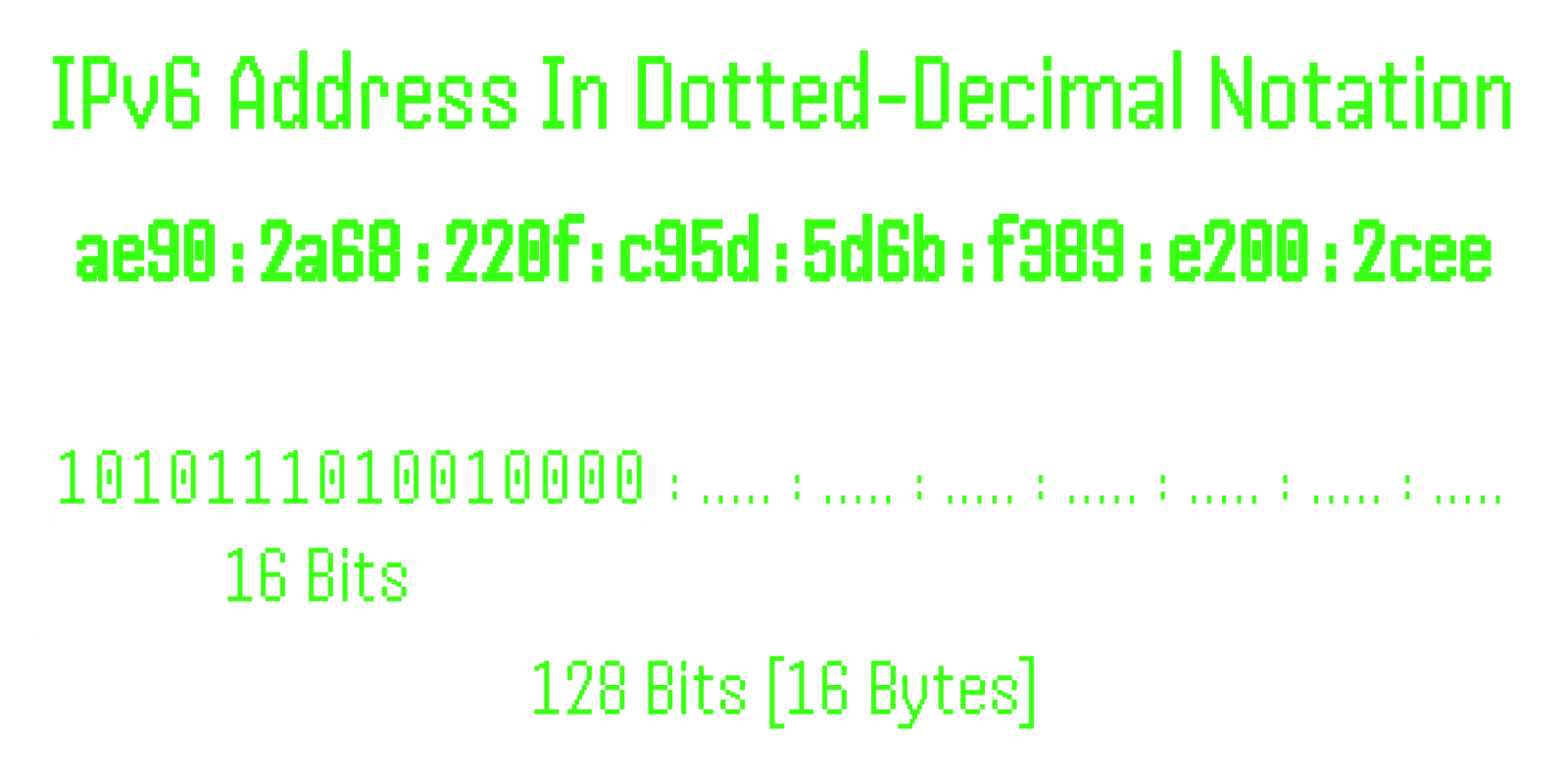
With a 128-bit address space, IPv6 offers a significantly larger address pool than IPv4, utilizing a hexadecimal format separated by colons [:].
IPv6 Address Format
128-bit address - Comprises eight groups, with each group representing 2 bytes [16 bits].
Hexadecimal format - Each hex-digit corresponds to 4 bits [1 nibble].
Delimiter: Colons [:] separate the groups.
Need for IPv6
Resource Allocation - IPv6 introduces traffic class and flow label fields for enhanced resource allocation,
supporting real-time traffic like audio and video.
The development of IPv6 was necessitated by the rapid growth of the Internet of Things [IoT] and the depletion of IPv4 addresses.
Other reasons include inefficiencies in IPv4, such as slow processing and limited support for multimedia and security features.
Enhanced Security - IPv6 includes encryption and authentication options to ensure packet confidentiality and integrity.
Larger Address Space - With 128 bits, IPv6 offers a vastly larger address pool compared to IPv4's 32-bit addresses.
New Options and Extensions - IPv6 is designed to accommodate future technology and protocol extensions.
IPv6 addresses these challenges through the following key improvements:
Improved Header Format - IPv6 separates header options from the base header,
streamlining routing by reducing the need for routers to check most options.
IPv6 Addressing Methods
IPv6 employs three primary addressing methods:
Multicast - Identifies multiple hosts that share a multicast destination address, allowing a packet to be distributed to all associated interfaces.
Unicast - Identifies a single network interface. Packets sent to a unicast address are delivered to the designated interface.
Anycast - Identifies a group of interfaces, with packets delivered to the nearest available interface in the group.
Note: IPv6 does not support broadcast addressing, which was available in IPv4.
Types of IPv6 Addresses
IPv6 addresses are categorized based on their purpose, and the first few bits help identify the type of address:
Provider-Based Unicast Address - Used for global communication. The first 3 bits identify this type, followed by registry and provider IDs.
Geography-Based Unicast Address - Global routing is based on the geographical location, though not commonly in use.
Local Unicast Addresses Include:
Link-Local Addresses - Used for communication on the same link. These addresses begin with FE80 and are not forwarded by routers.
Site-Local Addresses - Equivalent to private IP addresses in IPv4, used for communication within an organization. They start with FEC0.
Special IPv6 Addresses
IPv4-Compatible Addresses - Allows IPv6 devices to communicate with IPv4 devices.
IPv4-Mapped Addresses - Allows IPv6 applications to represent IPv4 addresses.
Loopback Address - Used for testing internal communications on a device.
Unspecified Address - Used when a device is not assigned an IP address.
Advantages of IPv6
Real-time Data Transmission - IPv6 improves the speed and efficiency of real-time data transmission, such as live streaming with minimal delays.
Encryption - IPv6 can encrypt data at the network layer, even when application-layer encryption is not present.
Authentication - IPv6 supports authentication mechanisms to ensure data integrity.
Faster Routing - IPv6 reduces processing time at routers due to its fixed-size base header [40 bytes],
compared to IPv4’s variable header size [20-60 bytes].
Disadvantages of IPv6
Conversion Challenges - The transition from IPv4 to IPv6 requires significant effort and time due to differences in address structures.
Communication Barrier - IPv4 and IPv6 devices cannot communicate directly without transitional mechanisms.
Transition Period - The global transition from IPv4 to IPv6 will take time due to the widespread use of IPv4.
No Backward Compatibility - IPv6 is not backward compatible with IPv4, posing challenges in adoption.
Conclusion
IPv6 was developed in response to IPv4's limitations, such as address exhaustion and processing inefficiencies.
With a 128-bit address space, IPv6 offers vast addressing potential, improved security, and better support for modern network applications.
Despite the advantages, the transition to IPv6 faces challenges such as incompatibility with IPv4 and the need for global infrastructure updates.
| IPv4 |
IPv6 |
| IPv4 has a 32-bit address length. |
IPv6 has a 128-bit address length. |
| It Supports Manual and DHCP address configuration. |
It supports Auto and renumbering address configuration. |
| In IPv4 end to end, connection integrity is Unachievable. |
In IPv6 end-to-end, connection integrity is Achievable. |
| It can generate 4.29×10^9 address space. |
The address space of IPv6 is quite large it can produce 3.4×10^38 address space. |
| The Security feature is dependent on the application. |
IPSEC is an inbuilt security feature in the IPv6 protocol. |
| Address representation of IPv4 is in decimal. |
Address representation of IPv6 is in hexadecimal. |
| Fragmentation performed by Sender and forwarding routers. |
In IPv6 fragmentation is performed only by the sender. |
| In IPv4 Packet flow identification is not available. |
In IPv6 packet flow identification are Available and uses the flow label field in the header. |
| In IPv4 checksum field is available. |
In IPv6 checksum field is not available. |
| It has a broadcast Message Transmission Scheme. |
In IPv6 multicast and anycast message transmission scheme is available. |
| In IPv4 Encryption and Authentication facility not provided. |
In IPv6 Encryption and Authentication are provided. |
| IPv4 has a header of 20-60 bytes. |
IPv6 has a header of 40 bytes fixed. |
| IPv4 can be converted to IPv6. |
Not all IPv6 can be converted to IPv4. |
| IPv4 consists of 4 fields which are separated by addresses dot [.]. |
IPv6 consists of 8 fields, which are separated by a colon [:]. |
| IPv4’s IP addresses are divided into five different classes. Class A , Class B, Class C, Class D , Class E. |
IPv6 does not have any classes of the IP address. |
| IPv4 supports VLSM [Variable Length subnet mask]. |
IPv6 does not support VLSM. |
| Example of IPv4: 66.94.29.13 |
Example of IPv6: 2001:0000:3238:DFE1:0063:0000:0000:FEFB |
MAC Addresses
Media Access Control [MAC] addresses are unique identifiers assigned to network interface cards [NICs] by their manufacturers.
They play a crucial role in communication within local network segments,
allowing devices to identify each other and ensure that data packets are transmitted to their intended recipients.
MAC Address Structure
A MAC address consists of 48 bits, typically displayed in hexadecimal format and separated by colons or hyphens [e.g., 01:23:45:67:89:AB].
The address can be divided into two parts:
Organizationally Unique Identifier [OUI] - The first 24 bits of a MAC address represent the OUI,
which is assigned to the device's manufacturer by the Institute of Electrical and Electronics Engineers [IEEE].
The OUI uniquely identifies the vendor of the network interface card.
Device Identifier - The remaining 24 bits are used by the manufacturer to assign a unique identifier to each network interface card they produce.
This ensures that every NIC has a distinct MAC address.
Finding the Vendor Using the MAC Address
To identify the vendor of a device based on its MAC address, you can use the OUI portion of the address.
By looking up the OUI in an online database or using a tool that has access to an updated OUI list,
you can determine which company manufactured the network interface card.
Here are a few methods to find the vendor using a MAC address:
IEEE OUI Lookup - The IEEE maintains an up-to-date list of OUI assignments, which can be accessed through their website.
By entering the OUI portion of the MAC address, you can retrieve information about the manufacturer.
Online MA - Address Lookup Tools, Several websites and online tools allow you to enter a MAC address and quickly retrieve information about the vendor.
Examples include Wireshark's OUI Lookup Tool and MAC Vendor Lookup.
The Essentials of Network
In today's world, where we rely heavily on the internet, there are several technical terms that we might encounter.
These terms might sound like jargon or alphabet soup to some people,
but they are actually important components that help our devices connect to the internet and communicate with each other.
Network Services
Let's start with DNS, which stands for Domain Name System.
Every website you visit has a unique IP address, which is a series of numbers that identifies the server where the website is hosted.
However, IP addresses can be difficult to remember, especially when there are millions of websites on the internet.
That's where DNS comes in. DNS translates human-readable domain names [like google.com] into IP addresses that computers can understand.
When you type a domain name into your web browser, your computer sends a DNS query to a DNS server, which responds with the IP address of the website you want to visit.
This allows your computer to connect to the correct server and load the website you requested.
In simpler terms, DNS acts as a phone book for the internet.
Just like how you look up a phone number in a phone book to call someone, your computer looks up a website's IP address in DNS to connect to it.
Moving on to DHCP, which stands for Dynamic Host Configuration Protocol.
DHCP is a protocol that automatically assigns IP addresses to devices on a network.
In the early days of networking, devices had to be manually configured with IP addresses, which was a time-consuming and error-prone process.
With DHCP, devices can automatically obtain an IP address from a DHCP server when they connect to a network.
This simplifies the process of setting up and managing a network, especially in large organizations with many devices.
To put it simply, DHCP assigns an IP address to your device when you connect to a network.
It's like checking into a hotel and being assigned a room number.
With DHCP, you don't have to manually configure your device's IP address every time you connect to a new network.
Finally, let's talk about ARP, which stands for Address Resolution Protocol.
ARP is a protocol that helps devices on a network find each other.
When a device wants to communicate with another device on the same network,
it needs to know the other device's MAC address, which is a unique identifier for the device's network interface.
However, devices typically only know each other's IP addresses, not their MAC addresses.
ARP allows a device to send a broadcast message on the network asking which device has a particular IP address.
The device with that IP address responds with its MAC address,
and the requesting device can then use that MAC address to communicate with the other device.
In simpler terms, ARP helps devices on a network find each other.
It's like asking a friend for someone's phone number so you can call or text them.
Port Numbers
In computer networking, a port is a communication endpoint that allows data to be exchanged between devices over a network.
There are many different types of ports, but in this chapter, we will focus on some of the most common ones, including SSH, HTTP, RDP, DHCP, and more.
First up is SSH, which stands for Secure Shell.
SSH is a secure protocol for accessing a remote computer over a network.
It uses encryption to protect the communication between the two devices,
making it a popular choice for system administrators and developers who need to access servers and other network devices remotely.
The default port for SSH is 22, but it can be changed to any other available port.
Next is HTTP, which stands for Hypertext Transfer Protocol.
HTTP is the foundation of the World Wide Web and is used to transfer web pages and other resources between servers and clients.
When you type a URL into your web browser, your computer sends an HTTP request to the server hosting the website,
which responds with the requested resource.
The default port for HTTP is 80, but it is often encrypted using HTTPS [HTTP Secure], which uses port 443.
RDP, or Remote Desktop Protocol, is a protocol used to access and control a remote computer.
It is commonly used by system administrators and support technicians to troubleshoot and fix issues on remote computers.
RDP uses port 3389 by default, but it is often used with a VPN [Virtual Private Network] to provide an extra layer of security.
DHCP, or Dynamic Host Configuration Protocol, is a protocol used to automatically assign IP addresses to devices on a network.
It simplifies the process of configuring network settings by allowing devices to obtain an IP address,
subnet mask, default gateway, and other network settings automatically.
DHCP uses ports 67 and 68 for communication between clients and servers.
SMTP, or Simple Mail Transfer Protocol, is a protocol used for sending email messages between servers.
When you send an email, your email client communicates with an SMTP server to send the message.
SMTP uses port 25 by default, but many email providers also support ports 465 and 587 for encrypted communication.
FTP, or File Transfer Protocol, is a protocol used for transferring files between servers and clients.
It is commonly used by web developers to upload and download files to and from web servers.
FTP uses ports 20 and 21 for communication, but it is often used with SSL/TLS [Secure Sockets Layer/Transport Layer Security] to encrypt the data being transferred.
| Service |
Port |
Secure Service |
Secure Port |
| FTP-File Transfer Protocol |
20/21 |
FTPS-File Transfer Protocol Secure |
989/990 |
| Telnet |
23 |
SSH/SCP/SFTP-Secure Shell/Secure Copy/Secure File Transfer Protocol |
22 |
| SMTP-Simple Mail Transport Protocol |
25 |
SMTPS-Simple Mail Transport Protocol Secure |
465 |
| DNS-Domain Name Service |
53 |
Domain Name Service [DNS] Over TLS |
853 |
| DHCP |
67/68 |
| HTTP-Hypertext Transfer Protocol |
80 |
HTTPS-Hypertext Transfer Protocol Secure |
443 |
| Kerberos |
88 |
| POP3-Post Office Protocol |
110 |
POP3S-Post Office Protocol Secure |
995 |
| NTP [Network Time] |
123 |
| Microsoft RPC EPMAP |
135 |
| NetBIOS-ns-NetBIOS Name Service |
137 |
| NetBIOS-dgm-NetBIOS Datagram Service |
138 |
| NetBIOS-ssn-NetBIOS Session Service |
139 |
| IMAP-Internet Message Access Protocol |
143 |
IMAPS-Internet Message Access Protocol Secure |
993 |
| SNMP [Monitoring] |
161/162 |
| BGP-Border Gateway Protocol |
179 |
| LDAP-Lightweight Directory Access Protocol |
389 |
LDAPS-Lightweight Directory Access Protocol Secure |
636 |
| SMB [Server Message Block] |
445 |
| Syslog |
514 |
Syslog-TLS |
6514 |
| VMware Server-VMware ESXi, Hypervisor |
902 |
| MS SQL Server |
1433 |
| MQTT [IoT] |
1883 |
MQTTS |
8883 |
| MySQL/MariaDB |
3306 |
| RDP [Remote Desktop Protocol] |
3389 |
| PostgreSQL |
5432 |
| RabbitMQ [AMQP] |
5672 |
| VNC [Desktop Sharing] |
5900 |
| Redis |
6379 |
| Proxies |
8080 |
| Cassandra [NoSQL] |
9042 |
| Elasticsearch [NoSQL] |
9200 |
| MongoDB [NoSQL] |
27017 |
These ports are commonly used for a variety of services such as web browsing, email, remote access, and database management.
It's important to note that these are just a few examples and there are many other ports used for different services.
Knowing which ports are used by different services is important for troubleshooting network issues,
securing your network, and understanding how different services communicate with each other.
Default Gateway vs. Router - Understanding the Difference
When it comes to computer networking, the terms "default gateway" and "router" are often used interchangeably, but they are not the same thing.
Understanding the difference between these two terms is important for anyone who wants to set up a network or troubleshoot network issues.
In this part, we'll explore what a default gateway is, what a router is, and how they differ from each other.
Default Gateway
A default gateway is an IP address on a network that serves as a route for all traffic that is not destined for a local network.
In other words, it's the address of the next hop that a device will send packets to if the destination IP address is not on the local network.
The default gateway is usually the IP address of the router that connects the local network to the internet.
For example, suppose you have a computer on a local network with an IP address of 192.168.1.10.
If the computer wants to send a packet to a website with an IP address of 192.168.2.10,
it will send the packet to the default gateway [i.e., the router], which will then forward the packet to the correct destination.
Router
A router is a device that connects two or more networks and routes traffic between them.
A router operates at the network layer [layer 3] of the OSI model and uses IP addresses to determine the next hop for each packet.
Routers can be physical devices, such as the ones provided by internet service providers [ISPs], or they can be virtual devices, such as software routers.
A router can perform a variety of functions, such as:
Routing traffic between networks.
Providing network address translation [NAT] to allow multiple devices to share a single public IP address.
Providing firewall and security features to protect the network.
Allocating IP addresses to devices on the network.
What's the Difference?
The main difference between a default gateway and a router is their function.
A default gateway is the IP address of the next hop for traffic that is not destined for a local network,
while a router is a device that connects two or more networks and routes traffic between them.
In other words, the default gateway is the address that a device uses to access the internet,
while a router is the device that makes that connection possible.
To summarize, a default gateway is a concept used within a local network to route traffic to the internet,
while a router is the device that connects multiple networks and routes traffic between them.
While these terms are often used interchangeably,
understanding their differences can help you troubleshoot network issues and optimize network performance.
TCP & UDP
What are TCP and UDP?
TCP [Transmission Control Protocol] and UDP [User Datagram Protocol] are the two main protocols of the Transport Layer [Layer 4 of the OSI model].
Both of them carry data between applications running on different devices, and both use port numbers [0 - 65,535] to deliver that data to the correct application.
For example, a web server listens on TCP port 443, while a DNS server listens on UDP port 53.
The difference between them is how they deliver the data:
TCP is connection-oriented - it sets up a connection before sending anything, and it makes sure every byte arrives, in order, without errors.
UDP is connectionless - it simply sends each message [datagram] to the destination, with no connection, no confirmation, and no retransmission.
A unit of TCP data is called a Segment, and a unit of UDP data is called a Datagram.
How TCP Works
TCP turns an unreliable network into a reliable, ordered stream of bytes between two hosts. It does this using several mechanisms:
Connection Setup - Before any data is sent, the two hosts perform the three-way handshake [explained below].
Sequence Numbers - Every byte sent is numbered, so the receiver can put segments back in the correct order and detect duplicates.
Acknowledgements [ACK] - The receiver confirms what it has received. If the sender does not get an ACK in time, it retransmits the missing data.
Checksum - Every segment carries a mandatory checksum, so corrupted segments are detected and discarded.
Flow Control - The receiver advertises a Window Size, telling the sender how much data it can accept, so a fast sender does not overwhelm a slow receiver.
Congestion Control - TCP slows down when it detects packet loss or delay [using algorithms such as Slow Start, CUBIC, or BBR], so it does not overload the network.
Connection Teardown - When finished, both sides close the connection gracefully using FIN packets, or abruptly using an RST [Reset] packet.
The TCP header is 20 bytes at minimum and up to 60 bytes with options.
How UDP Works
UDP is intentionally minimal. It adds only an 8-byte header to the data, which contains four fields:
Source Port, Destination Port, Length, and Checksum.
There is no handshake, no acknowledgements, no retransmission, no ordering, no flow control, and no congestion control.
Each datagram is independent - it may arrive out of order, arrive twice, or not arrive at all, and UDP will not notice.
If an application needs reliability on top of UDP, the application itself must provide it [this is exactly what QUIC does for HTTP/3].
The UDP checksum is optional in IPv4 but mandatory in IPv6.
A single UDP datagram can carry up to 65,507 bytes of data over IPv4, but in practice applications keep datagrams small [around 1,200 - 1,472 bytes],
because anything larger than the network's MTU [Maximum Transmission Unit] gets fragmented, and losing one fragment loses the whole datagram.
Key Differences Between TCP & UDP
| Feature |
TCP |
UDP |
| Connection |
Connection-oriented [three-way handshake] |
Connectionless |
| Reliability |
Guaranteed delivery with ACKs and retransmission |
Best-effort, no delivery guarantee |
| Ordering |
Data arrives in the order it was sent |
No ordering, datagrams may arrive out of order |
| Data Model |
Continuous byte stream |
Individual messages [datagrams] |
| Header Size |
20 - 60 bytes |
8 bytes |
| Error Checking |
Mandatory checksum, corrupted data is retransmitted |
Checksum [optional in IPv4], corrupted data is dropped |
| Flow & Congestion Control |
Yes |
No |
| Latency |
Higher [handshake, ACKs, retransmissions] |
Lower [send immediately] |
| Broadcast & Multicast |
Not supported [unicast only] |
Supported |
| Common Uses |
Web [HTTP/HTTPS], SSH, Email, FTP, Databases |
DNS, DHCP, NTP, VoIP, Live Streaming, Gaming, HTTP/3 [QUIC] |
When To Use TCP
TCP is the right choice whenever every byte matters and a small delay is acceptable.
Web Browsing - HTTP/1.1 and HTTP/2 [ports 80 and 443] run over TCP, because a web page with missing bytes is a broken page.
Remote Access - SSH [22] and RDP [3389] rely on TCP so that every keystroke and command arrives exactly as typed.
Email - SMTP [25/465/587], IMAP [143/993], and POP3 [110/995] all use TCP to make sure messages are delivered complete.
File Transfers - FTP, SFTP, and SMB [445] use TCP, because a single missing byte corrupts the file.
Databases & Financial Transactions - MySQL [3306], MS SQL [1433], online banking, and e-commerce require data integrity above all else.
When To Use UDP
UDP is the right choice when speed and low latency matter more than perfect delivery, or when messages are small and simple.
Real-Time Voice & Video - VoIP calls, video conferencing, and live streams use UDP [usually with RTP].
A late packet is useless in a live call, so it is better to skip it than to wait for a retransmission.
Online Gaming - Games send frequent position updates over UDP. If one update is lost, the next one replaces it a few milliseconds later.
Simple Request/Response Services - DNS [53], DHCP [67/68], NTP [123], SNMP [161/162], TFTP [69], and Syslog [514] send small messages where a handshake would cost more than the data itself.
Broadcast & Multicast - DHCP Discover messages and multicast video streams can only be sent with UDP, since TCP supports only one-to-one connections.
Modern Protocols - QUIC [the foundation of HTTP/3] and VPNs such as WireGuard run over UDP, and add their own reliability and encryption on top.
Common Misconceptions
"UDP is faster than TCP" - UDP has lower latency and less overhead, but it does not make the network itself faster.
For large transfers, TCP often achieves the same throughput, and UDP without congestion control can actually cause more packet loss.
"UDP is better for large files" - The opposite is true. Large files need every byte delivered correctly, which is exactly what TCP provides.
"DNS only uses UDP" - DNS uses UDP for normal queries, but switches to TCP [port 53] for large responses and for Zone Transfers [AXFR].
"UDP packets can be any size" - The theoretical limit is 65,507 bytes over IPv4, but large datagrams get fragmented and are far more likely to be lost.
3-Way Handshake
The three-way handshake is the process TCP uses to establish a connection between two devices before any data is exchanged.
During the handshake, each side chooses a random Initial Sequence Number [ISN] and confirms that it received the other side's ISN.
These sequence numbers are what allow TCP to track, order, and acknowledge every byte for the rest of the connection.
In the example below, Device A [the client] connects to Device B [the server]:
Step 1 - SYN [Synchronize] - Device A sends a segment with the SYN flag set and its own random sequence number, for example Seq = 1000.
This is Device A saying: "I want to open a connection, and my numbering starts at 1000."
Step 2 - SYN-ACK [Synchronize-Acknowledge] - Device B replies with both the SYN and ACK flags set.
It sends its own random sequence number, for example Seq = 5000, and acknowledges Device A's number with Ack = 1001 [A's ISN + 1].
This is Device B saying: "I received your request, I'm expecting your byte 1001 next, and my numbering starts at 5000."
Step 3 - ACK [Acknowledge] - Device A sends a final segment with the ACK flag set, Seq = 1001 and Ack = 5001 [B's ISN + 1].
This is Device A saying: "I received your number, and I'm expecting your byte 5001 next."
The connection is now ESTABLISHED, and both devices can start sending data.
Summary:
A → B : SYN [Seq = 1000]
B → A : SYN-ACK [Seq = 5000, Ack = 1001]
A → B : ACK [Seq = 1001, Ack = 5001]
Why are the sequence numbers random?
If the ISN were predictable, an attacker could guess it and inject forged packets into someone else's connection [TCP Session Hijacking].
Randomizing the ISN makes this kind of attack much harder.
Closing a TCP Connection
A TCP connection is closed gracefully using FIN [Finish] segments, and each direction is closed separately:
Device A sends FIN → Device B replies with ACK → Device B sends its own FIN → Device A replies with ACK.
This is often called the Four-Way Handshake [B's ACK and FIN are frequently combined into a single FIN-ACK segment].
After sending the final ACK, Device A waits in the TIME_WAIT state for a short time to make sure no delayed packets from the old connection cause problems.
A connection can also be terminated immediately with an RST [Reset] segment - for example, when a packet arrives for a port that has no listening service.
TCP & UDP From a Security Perspective
SYN Flood - An attacker sends a large number of SYN packets without ever completing the handshake,
filling the server's table of half-open connections until it can no longer accept legitimate users.
Defenses include SYN Cookies, rate limiting, and DDoS protection services.
Port Scanning with Nmap - The handshake is what makes TCP scanning possible:
SYN Scan [nmap -sS] - Sends a SYN. A SYN-ACK reply means the port is open, an RST means it is closed.
Nmap then sends an RST instead of completing the handshake, which is why it's called a "half-open" or "stealth" scan.
Connect Scan [nmap -sT] - Completes the full three-way handshake. It is used when raw packets are not allowed, but it is noisier and more likely to be logged.
UDP Scan [nmap -sU] - Much slower and less certain. Since UDP does not reply by design, no response means "open|filtered",
while an ICMP "Port Unreachable" message means the port is closed.
UDP Amplification & Spoofing - Because UDP has no handshake, the source IP address can easily be forged.
Attackers send small requests with the victim's IP address to open DNS, NTP, or Memcached servers,
which send much larger responses to the victim - turning a small amount of attacker traffic into a massive DDoS attack.
▲
▼